Understand template status and quality
What a template's status and quality mean, and when you should act.
After you submit a template, ChatReach keeps track of what WhatsApp decides and how customers respond to it. You'll find both on the Chat templates page, in the Status and Quality columns. They update automatically, so there's nothing to refresh.
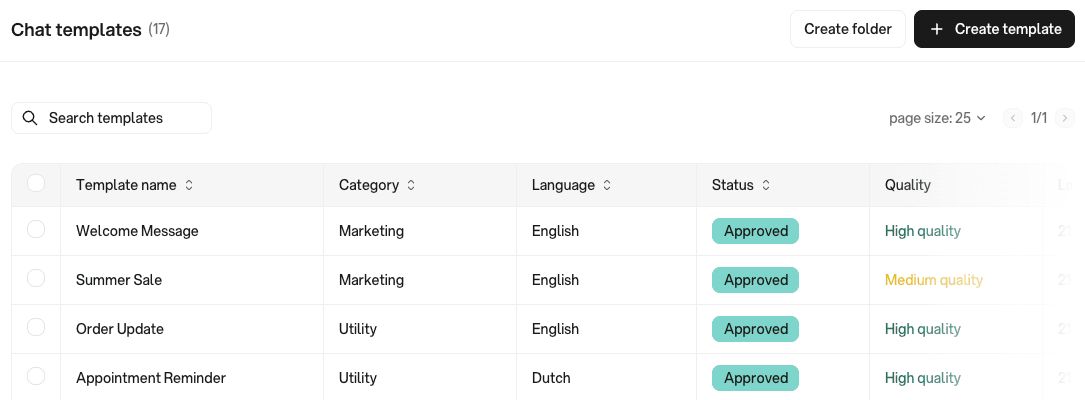
Status
Status tells you where a template is in Meta's review, and whether you can use it.
| Status | What it means |
|---|---|
| Draft | Saved, but not sent to WhatsApp yet. You can still edit it. |
| Pending review or In review | WhatsApp is reviewing it. This usually takes a few minutes, and at most 24 hours. |
| Approved | Ready to use in campaigns and automations. |
| In Appeal | You appealed a rejection, and WhatsApp is looking at it again. |
| Rejected | WhatsApp didn't approve it. See Template rejected. |
| Failed | It couldn't be sent to WhatsApp for review. See Template submission failed. |
| Paused | WhatsApp stopped it for a while because of negative feedback. It can't be sent until the pause ends. |
| Disabled | WhatsApp stopped it for good. Create a new template instead. |
| Pending deletion | You deleted it, and WhatsApp is removing it. |
Follow a template's history
Open the menu at the end of a row and click Show to see the template's details. The Activity section lists everything that happened to it, from Submitted to WhatsApp to Approved or Rejected, with the date and time. When WhatsApp rejects or pauses a template, the reason appears here too.
Quality
Once a template is approved, WhatsApp rates its quality based on how customers react to it, such as how often they read it and whether they block or report you. Think of it as a sign of whether people want this message.
| Rating | What to do |
|---|---|
| High quality | Nothing. Customers are happy with it. |
| Medium quality | Take a look. Some customers reacted negatively, or few read it. You can still send it. |
| Low quality | Act soon. You can still send it, but WhatsApp may pause it. Check who you're sending it to and whether the message is useful to them. |
| Quality pending | There's no rating yet. This is normal for a new template that hasn't been sent much. |
| — | The template isn't approved, so it doesn't have a rating. |
Hover over a rating to see a short explanation.
Template quality and number quality
Each template has its own quality rating. Your phone number also has one, based on all the messages it sends. A low-quality template can pull your number's rating down, so it's worth fixing early. See Understand your phone numbers.
When a template is paused
If a template's quality drops to Low quality, WhatsApp can pause it to protect customers from unwanted messages. While it's Paused, the template can't be sent, including in campaigns.
The first pause lasts 3 hours and the second lasts 6 hours. After that, the template goes back to Approved by itself. If it happens a third time, WhatsApp disables the template for good.
To keep your templates healthy:
- Send them to people who asked to hear from you.
- Keep the message relevant to the people who get it.
- Make it easy to opt out, for example with a Quick reply button.
Related guides
- Troubleshooting: fix rejected, failed and paused templates.
- Choose a template category and type
Still need help?
Our team is happy to help.